


3D Flip Clock & Weather
4.34.06K Reviews
App Specs
- Version
- 9.06.1
- Updated On
- License
- Free
- Downloads
- 1,000,000+
- Developer
- MACHAPP Software Ltd
- Categories
- Weather
- Platform
- Android
Screenshots
 Analysis by AppCompare
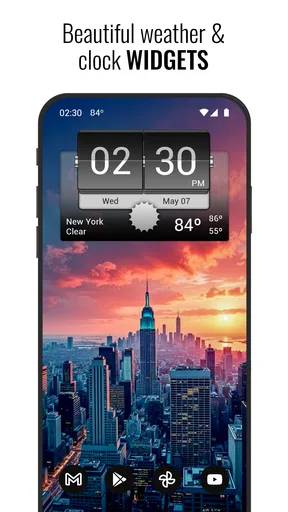
My favorite thing about 3D Flip Clock & Weather is the way it makes the forecast part of a home-screen glance rather than a separate errand. I can check the time and weather together, then decide whether to grab a jacket before heading out. That simple arrangement is the app’s strongest idea: useful information paired with a clock that has a little personality.
A clock widget that makes the forecast easier to notice
The flip animation is more than decoration if you like seeing the time without opening an app. A clock widget can turn a quick look at your phone into a small routine: check the hour, notice the conditions, and move on. I find that more convenient than opening a conventional weather app every time I want to know whether the day looks different from the morning forecast.
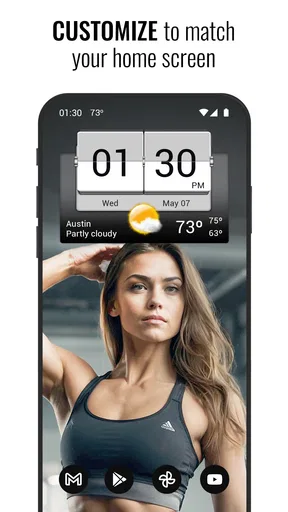
That convenience depends on choosing a widget size and appearance that work with your home screen. The larger the clock display, the easier it is to read at a glance, but it also claims more space from other shortcuts. I would start with a size that leaves room for the apps I use most, then adjust the clock skin and weather icons until the information feels clear rather than crowded.
The app comes from MACHAPP Software Ltd and combines the clock presentation with a full weather forecast. It is free to install, with optional in-app purchases ranging from $0.99 to $15.99 per item. Its Everyone content rating makes it suitable for a broad audience. The 4.3 average from around 38,000 ratings and more than a million installs suggest it has found a sizable audience, though those figures alone do not tell me whether its style will suit your phone.
How the widget fits into a real morning
Picture a weekday morning when I am making coffee, checking messages, and trying to leave on time. Instead of opening a forecast app and then returning to the home screen, I can glance at the clock-and-weather display first. If rain looks likely, I can take an umbrella; if I have more time, I can open the forecast for a closer look. The widget works best as a quick prompt, not as a replacement for thinking through a changing day.
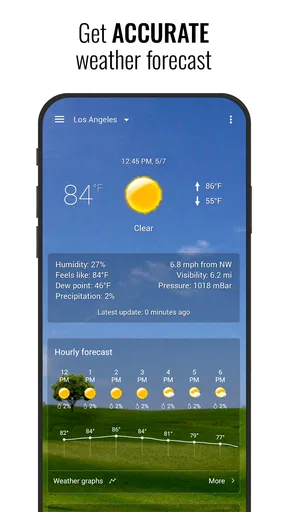
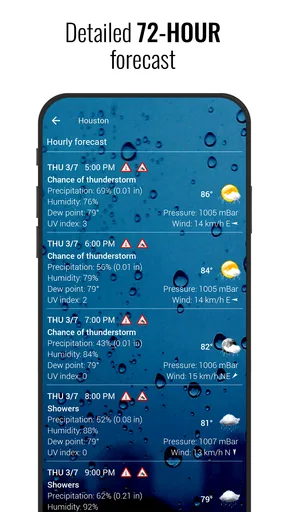
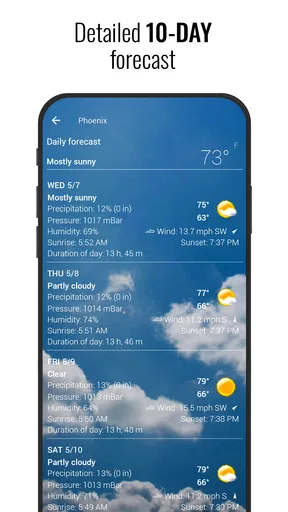
The hourly and daily forecasts give the glance a useful next step. An hourly view can help when I am deciding whether to walk now or wait, while the daily outlook is better for planning clothes or errands later. I would treat either forecast as guidance, especially when conditions are changeable, rather than assume that a tidy home-screen display guarantees perfect timing.
Location detection and prompt weather updates make the routine feel practical when I am moving between places. Still, I would check that the displayed location is the one I mean before relying on it, particularly if I have just travelled or want to plan for somewhere other than my current area. A location-based glance is convenient, but it is only useful when it matches the day I am actually planning.
Worth Reading Before You Choose

EA SPORTS FC Mobile 26 Is a Bigger Football Game, but It Takes Time

Flipboard Shows What News Apps Must Do Beyond the Feed

Switching to Android Auto Means Rethinking Your Driving Routine

Google Calendar Makes a Crowded Week Easier to Manage

Ludo King Makes the Most of the Minutes Between Plans

Baby Panda World Brings Quick Play to Modern Phones, but Its Game Library Feels Busy
Small settings with a noticeable payoff
The unit controls are worth setting early. Choosing Celsius or Fahrenheit, and selecting a wind-speed unit, means the forecast is readable without mentally translating it each time. This is a small setup step, but it matters if temperature or wind is part of how I decide what to wear. I would also keep the forecast units consistent with the ones I use elsewhere, so a quick comparison does not become a conversion exercise.
There is a practical trade-off between visual style and information density. A bolder clock skin can make the widget feel like a deliberate part of the home screen, but a busy design may make the weather details less immediate. I would prioritize legibility over novelty if the widget is there to help me leave the house on time. The flip effect is enjoyable, but the useful question is whether I can read the time and conditions in one glance.
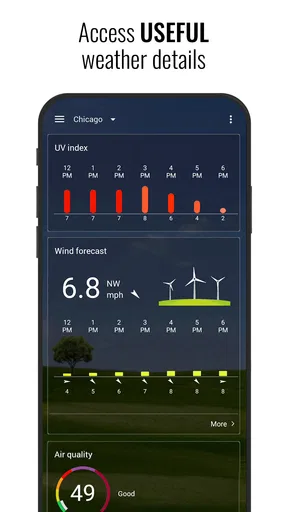
The moon phase, sunrise, and sunset displays add context that is easy to overlook in a basic forecast. Sunrise and sunset can help me plan an evening walk or decide whether I will still have daylight for an errand. Moon phases are more of a personal interest than a daily necessity, but I like having the detail available without turning the app into a dedicated astronomy tool.
Where it differs from a standard weather app
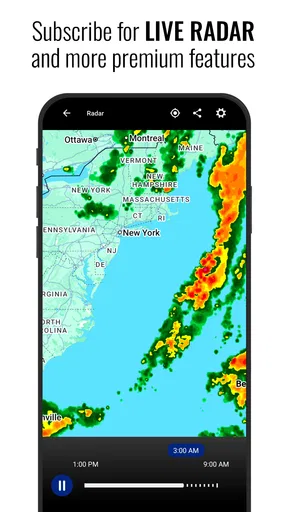
A typical weather app puts the forecast first and asks me to open it for details. This one gives equal visual weight to the clock, so it suits people who want time and weather together on the home screen. That is a real distinction, but it also means someone who wants a plain, compact forecast may find the clock styling unnecessary. If detailed weather maps or a stripped-down forecast view are the main priority, a conventional weather app may be a better fit.
The world clock is handy when I need to keep another time zone in mind, such as arranging a call with someone far away. I would use it as a quick reference rather than assume it replaces a specialist scheduling tool. Likewise, the flashlight option is a convenient extra, but it is not the reason I would choose a weather app. These additions are useful when they fit a quick phone check; they do not need to become the center of the experience.
One useful way to set up the app is to treat the home-screen widget as the first layer and the forecast as the second. Keep the widget focused on the time and the weather details you genuinely check, then open the app when you need the hourly or daily outlook. That approach avoids trying to fit every available detail into one glance and makes the widget more helpful during a busy morning.
Who will appreciate it, and who may not
I think this is a good match for someone who likes a distinctive clock, checks the weather several times a day, and wants both visible without switching between screens. It is also appealing if you enjoy adjusting the look of your home screen and are willing to spend a few minutes choosing a widget size, clock skin, and units that suit you. The best result comes from treating those choices as part of the setup, not expecting the default presentation to be perfect for every phone.
I would skip it if I wanted the least decorative route to a forecast, or if I rarely use widgets and prefer opening one focused weather app when needed. The flip animation and customization are part of its character, but they may feel like visual extras if all I need is a simple temperature check. It is also not the right choice for someone who expects a home-screen glance to answer every detailed weather question; opening the forecast is still the sensible move when plans depend on the conditions.
The app is free to start with, while optional purchases are available for people who want to explore paid extras. I would first see whether the basic clock-and-weather setup fits my routine before spending anything. Its current version is 9.01.0, and it supports devices running Android 7.0 or later, so compatibility is worth checking before installing on an older phone.
My take after using its central idea
As a weather app, it stands out less through novelty in forecasting and more through the way it brings a clock and weather information together. I like that the widget can turn a routine time check into a quick planning cue, and the unit settings and forecast views give that glance practical value. The design is not for everyone, and a conventional forecast app may serve better if visual restraint or more specialized weather tools matter most.
3D Flip Clock & Weather is worth trying if you want an attractive clock on your home screen and would genuinely use the forecast beside it. I would set the units first, choose a readable widget size, and give the display a few days to become part of my routine. If checking time and weather together saves me a screen change and helps me make a better everyday decision, the app has earned its place; if not, a simpler weather option will probably feel cleaner.
First impressions and visual character
Upon installing the app, the first thing that struck me was the sleek design. It's got this cool 3D flip animation for the clock, which is kind of mesmerizing. You know, the kind of thing you catch yourself staring at when you're supposed to be getting out the door. But hey, if you're going to be late, might as well be entertained.
Customizable elegance
Okay, so the aesthetics are pretty neat, but what's under the hood? The app offers a bunch of customizable options. We're talking widget sizes, clock skins, and weather icon sets. You can tailor it to fit your vibe, whether you like things minimalist or a bit more vibrant.
What I really enjoyed was the ability to tweak the weather settings. You can choose between Celsius and Fahrenheit, and there's even an option for wind speed units. It’s like your very own weather station, right on your phone. How cool is that?
Functionality meets style
Now, onto the nitty-gritty. The app doesn’t just look good; it performs well too. It provides hourly and daily weather forecasts, and the accuracy is pretty spot on. I mean, I haven't been caught in a surprise downpour yet, so that's a win in my book.
The location detection is quick, and the app updates weather data promptly. It’s refreshing not having to wait around for the latest weather info, especially when you're rushing out in the morning. Plus, the moon phase display is a neat little touch for those of us who like to keep track of that sort of thing.
Ease of use
As far as navigation goes, it's straightforward. The interface is intuitive, and you don't need a degree in meteorology to figure out what’s what. Just a few taps, and you're good to go. The app runs smoothly without any noticeable lag, which is always a plus in my books.
Little extras
Now, I can't forget to mention the additional features. There's a world clock function, which is super handy if you’re dealing with multiple time zones. And the sunrise and sunset times are also displayed, which I found surprisingly useful. I mean, who doesn't like knowing when they can catch that perfect golden hour?
Oh, and did I mention there’s a flashlight option? It’s one of those unexpected but incredibly convenient add-ons. You never know when you'll need it, but when you do, it’s right there at your fingertips.
Final thoughts
So, would I recommend this app? Absolutely. It’s one of those apps that combines form and function beautifully. Whether you're a weather aficionado or just someone who appreciates a good-looking clock, this app has something for you.
It’s fun, functional, and just adds that extra bit of flair to your device. So, if you’re in the market for a weather app that does a bit more than the basics, give this one a whirl. You might just find yourself checking the time and weather a little more often, just for the sheer joy of it.
Pros
- Visually appealing 3D clock interface.
- Customizable weather widgets available.
- Accurate and updated weather info.
- Easy integration with home screens.
- Low battery consumption.
Cons
- Limited free widget themes.
- Ads in the free version.
- Occasional sync delays.
- Requires internet for updates.
- No landscape mode support.
FAQs for 3D Flip Clock & Weather
What features does the 3D Flip Clock & Weather app offer?
The 3D Flip Clock & Weather app provides users with a visually appealing clock widget with a flip animation. It includes detailed weather forecasts with hourly updates, multiple widget styles, and customizable themes. Users can also access sunrise and sunset times, humidity levels, and more. The app supports multiple locations and provides accurate weather data tailored to your needs.
Is the 3D Flip Clock & Weather app free to use?
Yes, the 3D Flip Clock & Weather app is free to download and use. However, it contains in-app purchases and ads. Users can opt for a premium version to remove ads and access additional features. The free version still offers a comprehensive weather and clock experience, making it suitable for most users.
How accurate is the weather information provided by the app?
The 3D Flip Clock & Weather app sources its data from reliable weather services, ensuring accuracy in weather forecasts. It provides hourly updates and detailed forecasts for multiple days. While no weather app can guarantee 100% accuracy due to the unpredictable nature of weather, this app is generally reliable for planning daily activities.
Can I customize the appearance of the 3D Flip Clock & Weather widget?
Yes, the app offers extensive customization options for its widgets. Users can choose from various themes and styles to suit their preferences. You can change colors, fonts, and backgrounds, allowing you to personalize the widget to match your device's home screen. This level of customization enhances the user experience significantly.
Does the app consume a lot of battery or data?
The 3D Flip Clock & Weather app is optimized for efficiency, using minimal battery and data. It updates weather information at user-defined intervals to conserve resources. However, frequent updates and the use of detailed weather animations may slightly increase usage. Users can adjust settings to balance performance and resource consumption.


